Unconfigured Ad Widget

Collapse

Announcement

Collapse
No announcement yet.

Refund Please

Collapse
X
 
  • Filter
  • Time
  • Show
Clear All
new posts

  • Refund Please

    Phone P10 Plus
    Android Version 7.0
    EMUI Version 5.1
    User Name bl15279

    Bought 4 creds via app on googleplay to get bootloader code (wanted to relock the bootloader but I have lost the original key code) when I used the DC-Unlocker2 client I only had the option to Erase FRP and Temp Fastboot unlock, but needed more funds, so paid for 11 creds more.

    Pressed on the FRP and Temp Fastboot unlock and restarted but the phone is exactly like it was before I used the service.

    I need a bootloader code to lock the phone again. Can I have a refund of 11creds (11 euros) and a refund of 4 cred to be able to get the codes?

    BUT most importantly guidance in where/how to get the codes from. The client or the app on the phone. Thanks in advance.
    Last edited by Phoenix6670; 2019-08-07, 02:38 PM.

  • #2
    This would not have happened if you would have followed guide included in same email that you got your account details in. Anyway, refund for service used impossible now. Here is the guide for you personally: https://www.dc-unlocker.com/how-to-r...er-unlock-code FRP erase removes google account sing in request from boot up screen after phone is reseted, it does not give any codes and does not unlock any bootloaders, mentioned in frp erase guide as well.
    >>Free Octohide VPN for Android, find it on Google Play Here<<

    Comment


    • #3
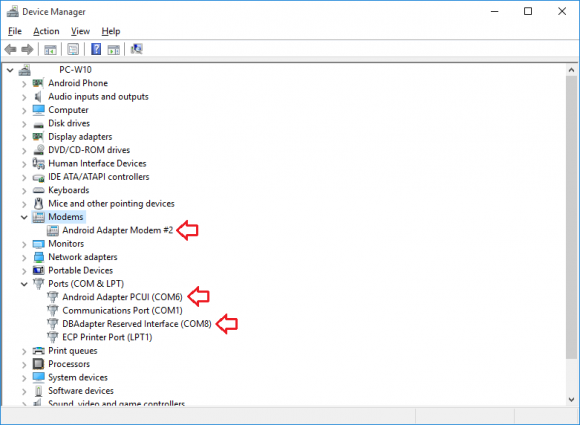
      That is exactly what I did but I did not have option to read code. All I had was as I said FRP erase. Furthermore I have also noticed that even after installing Hisuite which I have had since I bought the phone and have the current version it does not install either ANDROID ADAPTER MODEM#2 OR ANDROID ADAPTER PCUI OR DBADAPTER RESERVED INTERFACE. How do I get these drivers and from where definitely do not get installed with Hisuite 9.0.3.300_OVE

      The only way I could get the phone to be recognised was by having it in Fastboot mode it could not auto select phone as the "COM drivers are not used"

      Comment


      • #4
        You should open the guide and read at least step 1, if you can't fulfill it, does it mean you should do whatever you want and expect it will do whatever you imagine it would? Where are your senses Are you not inclined to contact right after and ask questions "hey i can't put phone in necessary mode, can i have refund?" - which would be totally normal.
        >>Free Octohide VPN for Android, find it on Google Play Here<<

        Comment


        • #5
          Ok so I messed up. But I followed Step 1 to the letter. It was step 2 that did not appear. It seems as you are not willing to reimburse me for an error, which is annoying but your perogative. BUT I still want help even if it cost me more money.

          Model Huawei P10 Plus
          FASTBOOT&RESCUE MODE - Phone Unlocked/FRP Lock

          I had previously unlocked the phone for free via huawei website years ago. BUT I have lost the code I was given. I thought that the FRP lock on the FASTBOOT &RESCUE MODE was the one the program meant but I guess it was not. Yes I am a noob on mobiles which I guess has already cost me LOADS of time and some money in my mistake.

          BaiscallyI need to Flash my rom but due to the FRP Lock I cannot do it. The only way to remove that lock is by firstly Locking the bootloader with a code (Which I have lost) and the Unlocking it with the code.

          So my question is if the bootloader is already unlocked can you provide a working code to Lock then Unlock the bootloader? If so would the cost be 4euros? Lastly as a goodwill action could I get this free, seeing as I have already paid 15euros and admittedly by my own mistake wasted?

          Thanks in advance

          Comment


          • #6
            Step 1 indicates to put mobile in manufacturer mode, you skipped that step and detected your phone in fastboot. We do not have bootloader codes, mobiles has it inside, therefore we offer only read bootloader code service.
            >>Free Octohide VPN for Android, find it on Google Play Here<<

            Comment

            Working...
            X