
 Tweet
Tweet
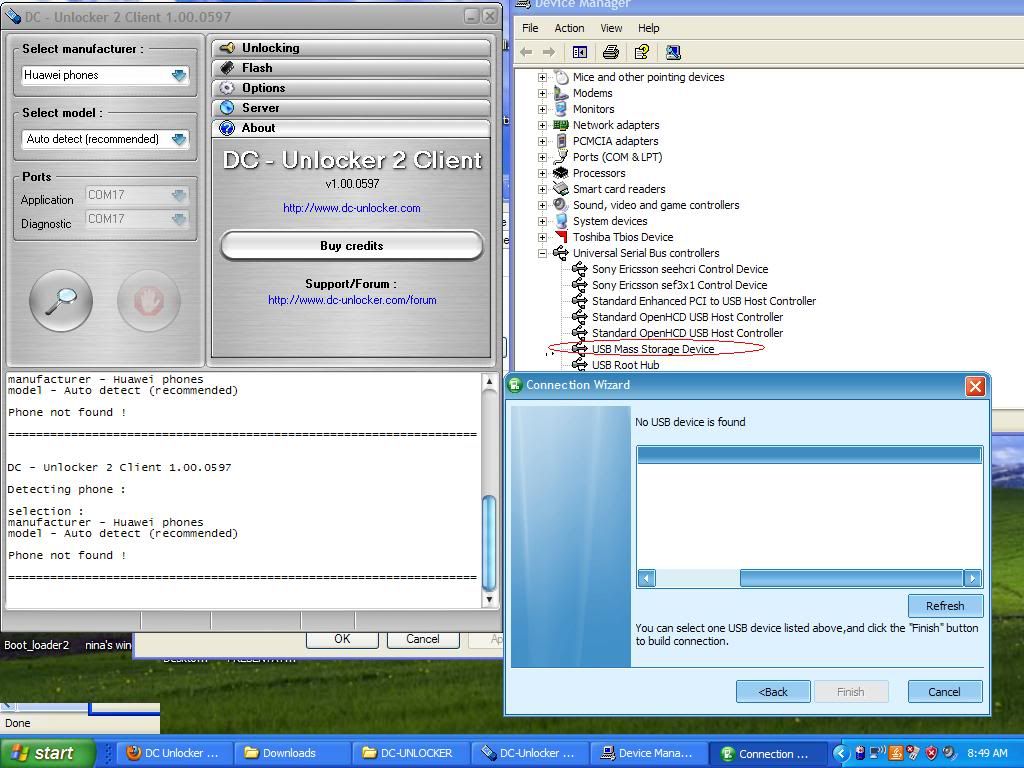
 Huawei U7519 cannot detect via DC-Unlocker. NEED HELP ASAP!
Hello team DC-unlocker,
Please kindly help me how tomake this U7519 detect via your software
I did manage to unlock one of this 6 months ago but for this time I cannot make it detect.
For correct Huawei phone detection, please turn ON phone, wait while fully starts, turn into USB and after windows detects device, you can press "Detect phone".
DC - Unlocker 2 Client 1.00.0597
Detecting phone :
selection :
manufacturer - Huawei phones
model - Huawei U7510/U7517/U7519
Phone not found !
AND I NOTICED THAT MY COMPUTER DETECTED IT AS A MASS STORAGE!
By like your advice to turn on USB... but for this U7519 there is no festures to change MASS STORAGE to USB MODE
I tried with AUTO DETECT and MANUAL detect via HUAWEI PHONES MODE.
Please kindly HELP URGENT!
Thank you
Please kindly help me how tomake this U7519 detect via your software
I did manage to unlock one of this 6 months ago but for this time I cannot make it detect.
For correct Huawei phone detection, please turn ON phone, wait while fully starts, turn into USB and after windows detects device, you can press "Detect phone".
DC - Unlocker 2 Client 1.00.0597
Detecting phone :
selection :
manufacturer - Huawei phones
model - Huawei U7510/U7517/U7519
Phone not found !
AND I NOTICED THAT MY COMPUTER DETECTED IT AS A MASS STORAGE!
By like your advice to turn on USB... but for this U7519 there is no festures to change MASS STORAGE to USB MODE
I tried with AUTO DETECT and MANUAL detect via HUAWEI PHONES MODE.
Please kindly HELP URGENT!
Thank you
Comment