Unconfigured Ad Widget

Collapse

Announcement

Collapse
No announcement yet.

u8150 not unlock

Collapse
X
 
  • Filter
  • Time
  • Show
Clear All
new posts

  • u8150 not unlock

    hi maste gintas need help pls..

    not highlight unlock


  • #2
    after successfully unlock no service help me pls master gintas..

    Comment


    • #3
      Originally posted by haslyn View Post
      after successfully unlock no service help me pls master gintas..
      Can you detect the phone again with DC-Unlocker and copy here what is detected?

      Comment


      • #4
        Originally posted by Gintas View Post
        Can you detect the phone again with DC-Unlocker and copy here what is detected?
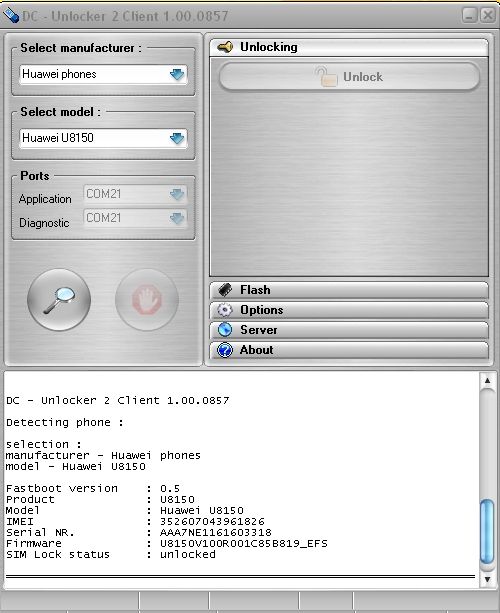
        Step by step guide for Huawei phone unlock


        DC - Unlocker 2 Client 1.00.0857

        Detecting phone :

        selection :
        manufacturer - Huawei phones
        model - Auto detect (recommended)

        Fastboot version : 0.5
        Product : U8150
        Model : Huawei U8150
        IMEI : 352607043961826
        Serial NR. : AAA7NE1161603318
        Firmware : U8150V100R001C85B819_EFS
        SIM Lock status : unlocked

        ================================================== =================

        Comment


        • #5
          Originally posted by haslyn View Post
          Step by step guide for Huawei phone unlock


          DC - Unlocker 2 Client 1.00.0857

          Detecting phone :

          selection :
          manufacturer - Huawei phones
          model - Auto detect (recommended)

          Fastboot version : 0.5
          Product : U8150
          Model : Huawei U8150
          IMEI : 352607043961826
          Serial NR. : AAA7NE1161603318
          Firmware : U8150V100R001C85B819_EFS
          SIM Lock status : unlocked

          ================================================== =================
          There was something done with this phone before, so that is why it did not have service anymore.
          This was found after contacting via Live Chat.

          Comment


          • #6
            same problem

            does there need to be a sim card to have the DC-unlocker recognize phone. The phone shows up in CD drives, but not as a modem or phone. The unlocker cannot find it. I am very new to androids. A friend gave me this phone to replace my son's dead phone, but I need to unlock it (t-mobile now, need att)

            Comment


            • #7
              Originally posted by kimmiejean View Post
              does there need to be a sim card to have the DC-unlocker recognize phone. The phone shows up in CD drives, but not as a modem or phone. The unlocker cannot find it. I am very new to androids. A friend gave me this phone to replace my son's dead phone, but I need to unlock it (t-mobile now, need att)
              Please read and follow these instructions: http://www.dc-unlocker.com/huawei_ph...lock_tutorials
              Phone must be in fastboot modem in order to detect it.

              Comment


              • #8
                Nope -- driver is installed and updated. connected to computer in fastboot modem (opening screen on). DC still cannot locate it.

                Comment


                • #9
                  Originally posted by kimmiejean View Post
                  Nope -- driver is installed and updated. connected to computer in fastboot modem (opening screen on). DC still cannot locate it.
                  Are you sure you followed these instructions step-by-step? http://www.dc-unlocker.com/huawei_u8...lock_procedure
                  Did you install drivers from procedure link?

                  Comment


                  • #10
                    Cannot install Fastboot driver - Pulse drivers_Windows 7

                    If you say that the device (U8150) must be in fastboot mode in order to unlock then please instruct on how to properly install the drivers for Windows 7 because my system's device manager says the native Android drivers are updated enough!

                    The IMEI number for my device is 352608042400428

                    Comment


                    • #11
                      Originally posted by debbie470 View Post
                      If you say that the device (U8150) must be in fastboot mode in order to unlock then please instruct on how to properly install the drivers for Windows 7 because my system's device manager says the native Android drivers are updated enough!

                      The IMEI number for my device is 352608042400428
                      How to put phone into fastboot correctly you see in unlock procedure link. First sentence describes it.

                      If driver installation procedure for windows 7 does not work for you, check these: http://www.dc-unlocker.com/huawei_u8...procedure/win7
                      This procedure is different, maybe it will help you.

                      Comment


                      • #12
                        Flash Option

                        Thanks for the quick reply although I have another question concerning flashing the U8150. Would you be able to provide a link with instructions on that? I would like to successfully install a custom ROM

                        Comment


                        • #13
                          Originally posted by debbie470 View Post
                          Thanks for the quick reply although I have another question concerning flashing the U8150. Would you be able to provide a link with instructions on that? I would like to successfully install a custom ROM
                          No, sorry. We provide only DC-Unlocker unlocking service. Flashing or installing custom ROM is not in our service.

                          Comment

                          Working...
                          X