Unconfigured Ad Widget

Collapse

Announcement

Collapse
No announcement yet.

Zte MF51 for unlock,not detected sa dc unlocker

Collapse
X
 
  • Filter
  • Time
  • Show
Clear All
new posts

  • Zte MF51 for unlock,not detected sa dc unlocker

    i have zte mf51 for unlock but unfortunate cant detect by dc unlocker

    this is not my 1st time to unlock other wifi router but not like this model

    but this model is not detected,properly installed the driver.
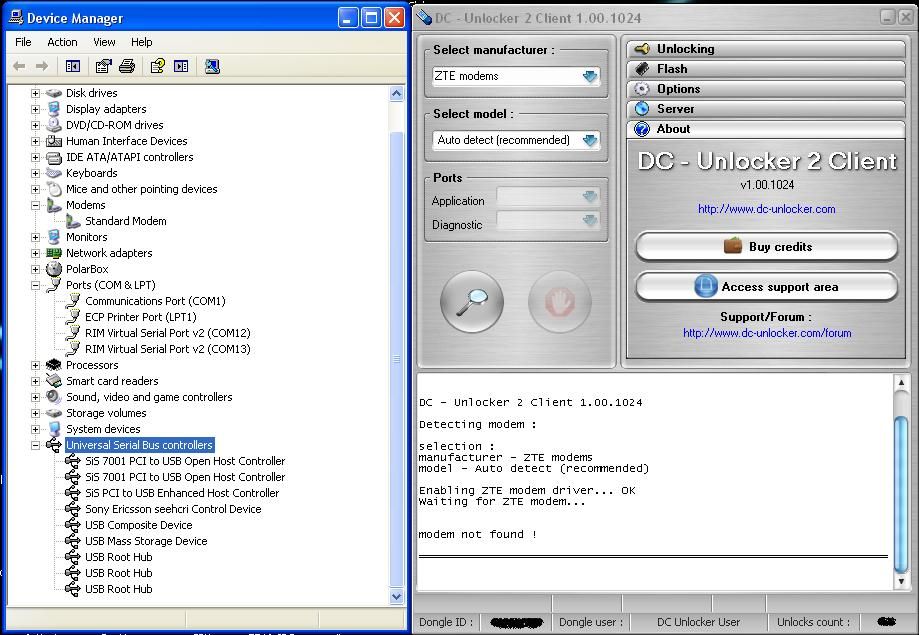


    DC - Unlocker 2 Client 1.00.1024

    Detecting modem :

    selection :
    manufacturer - ZTE modems
    model - Auto detect (recommended)

    Enabling ZTE modem driver... OK
    Waiting for ZTE modem...


    modem not found !
    pls reply asap

    br,

  • #2
    Modem connected by usb cable? Try to run dc-unlocker as administrator before detecting.

    Comment


    • #3
      yess modem is connected via usb, and im using xp sp3...

      so is there any chance to unlock this by dc unlocker...

      what can i do now?

      Comment


      • #4
        Originally posted by nelsky View Post
        yess modem is connected via usb, and im using xp sp3...

        so is there any chance to unlock this by dc unlocker...

        what can i do now?
        Try to run our software as administrator, by clicking right mouse button on DC-Unlocker -> Run as... and select "run as administrator”. Other connected phones/modems may cause this problem as well. Does the driver installation finishes successfully when you run detection?
        >>Free Octohide VPN for Android, find it on Google Play Here<<

        Comment


        • #5
          same problem sir...yess all the driver is properly installed...

          pls my ym id you can check this via teamviewer..

          ym: [email protected]

          we have the same issue upon detecting this model pls refer to this link below

          Comment


          • #6
            Originally posted by nelsky View Post
            same problem sir...yess all the driver is properly installed...

            pls my ym id you can check this via teamviewer..

            ym: [email protected]

            we have the same issue upon detecting this model pls refer to this link below

            https://www.dc-unlocker.com/forum/sh...light=zte+mf51
            Problem now is that it is not recognized by computer correctly. It should appear under modems and ports lines. Maybe it is connected to the internet at detection time?
            >>Free Octohide VPN for Android, find it on Google Play Here<<

            Comment


            • #7
              so what's the exact procedure in order to detect this type of modem

              bcoz is not only me encountering this difficulties.and this is not my 1st time

              unlock other modem that's why im wondering.

              br,

              Comment


              • #8
                Originally posted by nelsky View Post
                so what's the exact procedure in order to detect this type of modem

                bcoz is not only me encountering this difficulties.and this is not my 1st time

                unlock other modem that's why im wondering.

                br,
                Try to install these drivers for your device - https://files.dc-unlocker.com/backen...FE91532B2B6BC2 then check if it appeared differently in device manager - under modems/ports lines. Make sure MF60 is not connected to the internet at detection time.
                >>Free Octohide VPN for Android, find it on Google Play Here<<

                Comment


                • #9
                  is this a auto install driver exe? i tried to dl but i can't open the sw, similar in

                  notepad docs.

                  Originally posted by Valdemaras View Post
                  Try to install these drivers for your device - https://files.dc-unlocker.com/backen...FE91532B2B6BC2 then check if it appeared differently in device manager - under modems/ports lines. Make sure MF60 is not connected to the internet at detection time.

                  Comment


                  • #10
                    Originally posted by nelsky View Post
                    is this a auto install driver exe? i tried to dl but i can't open the sw, similar in

                    notepad docs.
                    This is a .rar file that you need to extract.
                    >>Free Octohide VPN for Android, find it on Google Play Here<<

                    Comment


                    • #11
                      not in rar file, check it again.

                      Originally posted by Valdemaras View Post
                      This is a .rar file that you need to extract.

                      Comment


                      • #12
                        Originally posted by nelsky View Post
                        not in rar file, check it again.
                        You mean the setup file after extracting from .rar? Then yes its .msi but it works same way by double clicking on it and running the setup. Have just installed them.
                        >>Free Octohide VPN for Android, find it on Google Play Here<<

                        Comment


                        • #13
                          thanks but same result

                          DC - Unlocker 2 Client 1.00.1024

                          Detecting modem :

                          selection :
                          manufacturer - ZTE modems
                          model - Auto detect (recommended)

                          Enabling ZTE modem driver... OK
                          Waiting for ZTE modem...


                          modem not found !

                          Comment


                          • #14
                            Originally posted by nelsky View Post
                            thanks but same result
                            Maybe your device is visible in My Computer/Computer under CDROMS? If so try to eject it, then check if it appeared differently in device manager and try to detect it.
                            >>Free Octohide VPN for Android, find it on Google Play Here<<

                            Comment


                            • #15
                              yess sir its true its visible in My Computer/under CDROMS, i tried to eject but

                              same result modem not found and nothing changes in Device Manager.

                              would try this sir via teamviewer if its ok to you.

                              Originally posted by Valdemaras View Post
                              Maybe your device is visible in My Computer/Computer under CDROMS? If so try to eject it, then check if it appeared differently in device manager and try to detect it.

                              Comment

                              Working...
                              X