Unconfigured Ad Widget

Collapse

Announcement

Collapse
No announcement yet.

I need help

Collapse
X
 
  • Filter
  • Time
  • Show
Clear All
new posts

  • I need help

    Do not know the modem code and ask for possible help


  • #2
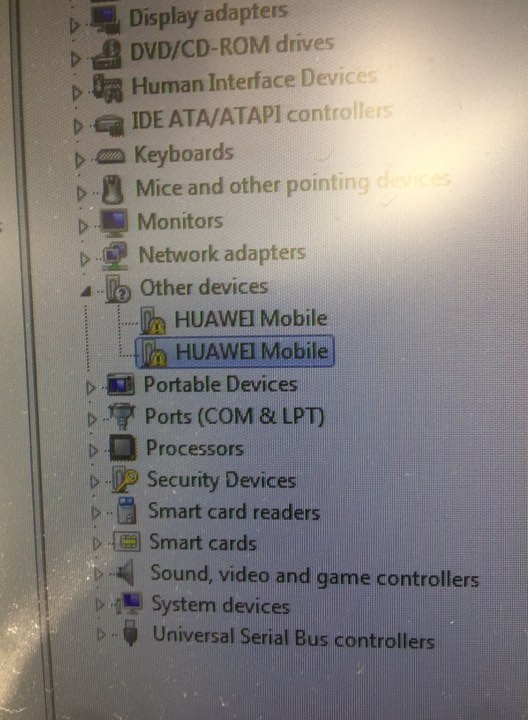
    Hello, you need to apply usb drivers for your modem in order for it to appear correctly in device manager. Right click on those lines and select update/install driver, then manually direct to driver folder on pc.
    >>Free Octohide VPN for Android, find it on Google Play Here<<

    Comment


    • #3
      Originally posted by Valdemaras View Post
      Hello, you need to apply usb drivers for your modem in order for it to appear correctly in device manager. Right click on those lines and select update/install driver, then manually direct to driver folder on pc.


      Tam solved the problem and now become a problem please help


      selection :
      manufacturer - Huawei modems
      model - Auto detect (recommended)

      Found Applications port COM17

      Found modem : E5372
      Model : Huawei E5372 / MegaFon MR100-3
      IMEI : 864578015581747
      Serial NR. : N7GDW14913001635
      Firmware : 21.236.03.04.397
      Compile date / time : May 08 2014 22:30:50
      Hardware ver. : CL1E5372SM
      Dashboard version : WEBUI_13.100.08.03.397_E5_V7R1_V3R2
      SIM Lock status : Locked (Card lock)
      Wrong codes entered : 0 (unlock attempts left : 10)

      ================================================== =================

      Unlocking, please wait ...

      Error connecting to server !

      Error code 62

      unlock failed !

      ================================================== =================

      Comment


      • #4
        my own problem is

        DC - Unlocker 2 Client 1.00.1392

        Detecting modem :

        selection :
        manufacturer - Huawei modems
        model - Auto detect (recommended)

        Enabling Huawei modem driver... OK
        Waiting for Huawei modem...

        modem not found !

        Comment


        • #5
          Originally posted by mau20101994 View Post


          Tam solved the problem and now become a problem please help


          selection :
          manufacturer - Huawei modems
          model - Auto detect (recommended)

          Found Applications port COM17

          Found modem : E5372
          Model : Huawei E5372 / MegaFon MR100-3
          IMEI : 864578015581747
          Serial NR. : N7GDW14913001635
          Firmware : 21.236.03.04.397
          Compile date / time : May 08 2014 22:30:50
          Hardware ver. : CL1E5372SM
          Dashboard version : WEBUI_13.100.08.03.397_E5_V7R1_V3R2
          SIM Lock status : Locked (Card lock)
          Wrong codes entered : 0 (unlock attempts left : 10)

          ================================================== =================

          Unlocking, please wait ...

          Error connecting to server !

          Error code 62

          unlock failed !

          ================================================== =================
          Check adapter binding settings https://www.dc-unlocker.com/adapter-binding-settings

          If adapters do not solve connection problem check metrics:
          control panel > network and internet > network connections > Right click on your device that you want to unlock connection > Properties > Internet protocol (TCP/IPv4) > Properties > Advanced > IP settings > Uncheck "Automatic metric". Set Interface metric as "200". OK > OK > OK
          >>Free Octohide VPN for Android, find it on Google Play Here<<

          Comment


          • #6
            Originally posted by Edu Onah View Post
            my own problem is

            DC - Unlocker 2 Client 1.00.1392

            Detecting modem :

            selection :
            manufacturer - Huawei modems
            model - Auto detect (recommended)

            Enabling Huawei modem driver... OK
            Waiting for Huawei modem...

            modem not found !
            Install drivers via device manager, your device visible there now with "!" or with "?". Then repeat detection.
            >>Free Octohide VPN for Android, find it on Google Play Here<<

            Comment


            • #7
              this is what I see
              You do not have permission to view this gallery.
              This gallery has 1 photos.

              Comment


              • #8
                Originally posted by Edu Onah View Post
                this is what I see
                e5577c driver

                Comment


                • #9
                  Originally posted by Edu Onah View Post
                  this is what I see
                  selection :
                  manufacturer - Huawei modems
                  model - Auto detect (recommended)

                  Enabling Huawei modem driver... OK
                  Waiting for Huawei modem...

                  modem not found !

                  Comment


                  • #10

                    e5577c driver

                    Comment


                    • #11
                      Originally posted by mau20101994 View Post
                      e5577c driver
                      All drivers that we have are on support area.
                      >>Free Octohide VPN for Android, find it on Google Play Here<<

                      Comment


                      • #12
                        I dont even understand.. Its model is E3531

                        Comment


                        • #13
                          Originally posted by mau20101994 View Post

                          selection :
                          manufacturer - Huawei modems
                          model - Auto detect (recommended)

                          Enabling Huawei modem driver... OK
                          Waiting for Huawei modem...

                          modem not found !
                          Install drivers via device manager, your device visible there now with "!" or with "?". Then repeat detection.
                          >>Free Octohide VPN for Android, find it on Google Play Here<<

                          Comment


                          • #14
                            someone should talk to me!! what else should I do?

                            Comment


                            • #15
                              Originally posted by Edu Onah View Post
                              someone should talk to me!! what else should I do?
                              Install drivers via device manager, your device visible there now with "!" or with "?". Then repeat detection.
                              >>Free Octohide VPN for Android, find it on Google Play Here<<

                              Comment

                              Working...
                              X