If this is your first visit, be sure to
check out the FAQ by clicking the
link above. You may have to register
before you can post: click the register link above to proceed. To start viewing messages,
select the forum that you want to visit from the selection below.
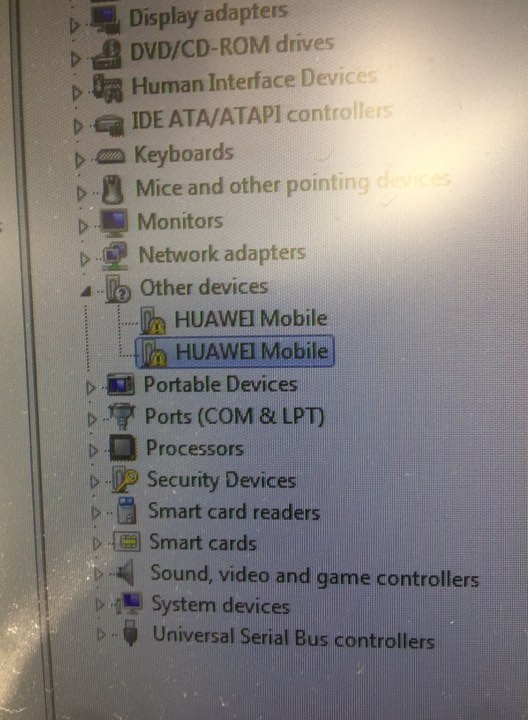
Hello, you need to apply usb drivers for your modem in order for it to appear correctly in device manager. Right click on those lines and select update/install driver, then manually direct to driver folder on pc.
Hello, you need to apply usb drivers for your modem in order for it to appear correctly in device manager. Right click on those lines and select update/install driver, then manually direct to driver folder on pc.
Tam solved the problem and now become a problem please help
selection :
manufacturer - Huawei modems
model - Auto detect (recommended)
Found Applications port COM17
Found modem : E5372
Model : Huawei E5372 / MegaFon MR100-3
IMEI : 864578015581747
Serial NR. : N7GDW14913001635
Firmware : 21.236.03.04.397
Compile date / time : May 08 2014 22:30:50
Hardware ver. : CL1E5372SM
Dashboard version : WEBUI_13.100.08.03.397_E5_V7R1_V3R2
SIM Lock status : Locked (Card lock)
Wrong codes entered : 0 (unlock attempts left : 10)
If adapters do not solve connection problem check metrics: control panel > network and internet > network connections > Right click on your device that you want to unlock connection > Properties > Internet protocol (TCP/IPv4) > Properties > Advanced > IP settings > Uncheck "Automatic metric". Set Interface metric as "200". OK > OK > OK
We process personal data about users of our site, through the use of cookies and other technologies, to deliver our services, personalize advertising, and to analyze site activity. We may share certain information about our users with our advertising and analytics partners. For additional details, refer to our Privacy Policy.
By clicking "I AGREE" below, you agree to our Privacy Policy and our personal data processing and cookie practices as described therein. You also acknowledge that this forum may be hosted outside your country and you consent to the collection, storage, and processing of your data in the country where this forum is hosted.

 Tweet
Tweet
Comment